Rows and columns
The extra row and column options Highend adds on top of WPBakery's own Row and Column elements.
WPBakery's Row and Column elements are the foundation every Highend layout is built on. Highend adds its own settings on top of WPBakery's (entrance animations, full-width backgrounds, one-page anchors, and position offsets) as extra tabs on the row's edit panel. With WPBakery 9.0 or newer, rows and columns also get a flexbox-powered Layout tab, rows get a Stacked Cards tab, and columns get a Background Video tab.
Where to find it: click the pencil icon on any row to open Edit this row, or hover a column and click its pencil icon.
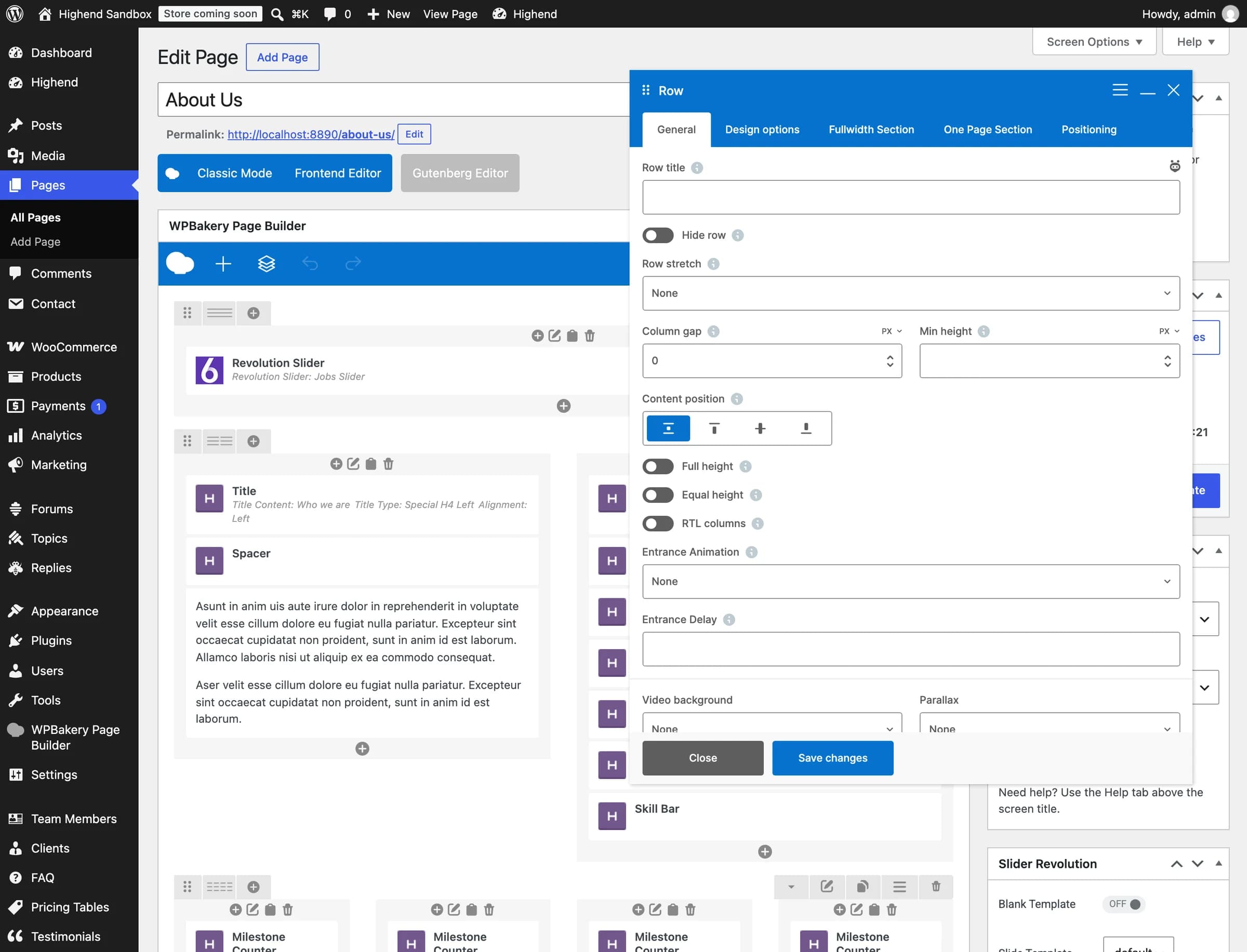 Design options is WPBakery's own tab; the other three are Highend's.
Entrance animation
On the row's General tab (and on every column), Highend adds:
NoneanimationAnimates the row or column into view as it scrolls into the browser viewport. Choose from Fade In, Scale Up, Scale Down, Right to Left, Left to Right, Top to Bottom, Bottom to Top, Rise In, Helix, Flip-X, Flip-Y, or Spin. Rise In fades the element in while it moves up and settles to its full size.
animation_delayDelay in milliseconds before the animation starts, for staggering multiple elements. Enter the number only, no ms suffix.
Reveal animations
WPBakery's CSS animation setting (in Design Options on rows and columns, and in the settings of Custom Heading, Text Block and most WPBakery elements) gets a Reveal group:
- Reveal words: each word rises out of its own mask, one after the other. Long headings still finish quickly.
- Reveal lines: each line rises as one, a beat after the line above it.
- Reveal letters: each letter rises out of its word's mask, one after the other. Words stay whole, so they never break across lines.
- Drop letters: the same, with the letters coming down from above.
- Blur words and Blur letters: each word or letter rises a little while it sharpens out of a blur.
- Rise in: the whole element fades in while it moves up and settles to its full size. Good for cards and sections.
A row, column or section set to one of the text reveals fades in as a whole; they are meant for text elements. Words in scripts whose letters join, such as Arabic, stay whole with the letter reveals. Line breaks, Balance Lines and links in the text stay as they are. Visitors who prefer reduced motion see the text without the movement, and the front-end editor shows it as is.
These play once when the text scrolls into view. To have Custom Heading and Text Block text fill in as it scrolls up the screen, word by word or letter by letter, use Scroll Reveal instead.
hb_animation_delayIn milliseconds, for example 300. How long the CSS animation waits once the element scrolls into view. On Custom Heading, rows, columns and inner rows and columns. Give the cards of a grid growing delays (0, 100, 200) and they come in one after another.
Reveals read best on large headings. Use them on the headings that lead each section and let the body text simply be there, so the page doesn't feel busy.
Overlay
On rows, inner rows, columns and inner columns, the Design Options tab gets an overlay under the background settings. It puts a color over a background image or video, below the content, so text on a photo stays readable. It follows the element's rounded corners and Corner Shape, and sits above a background video and the moving image of WPBakery's Parallax.
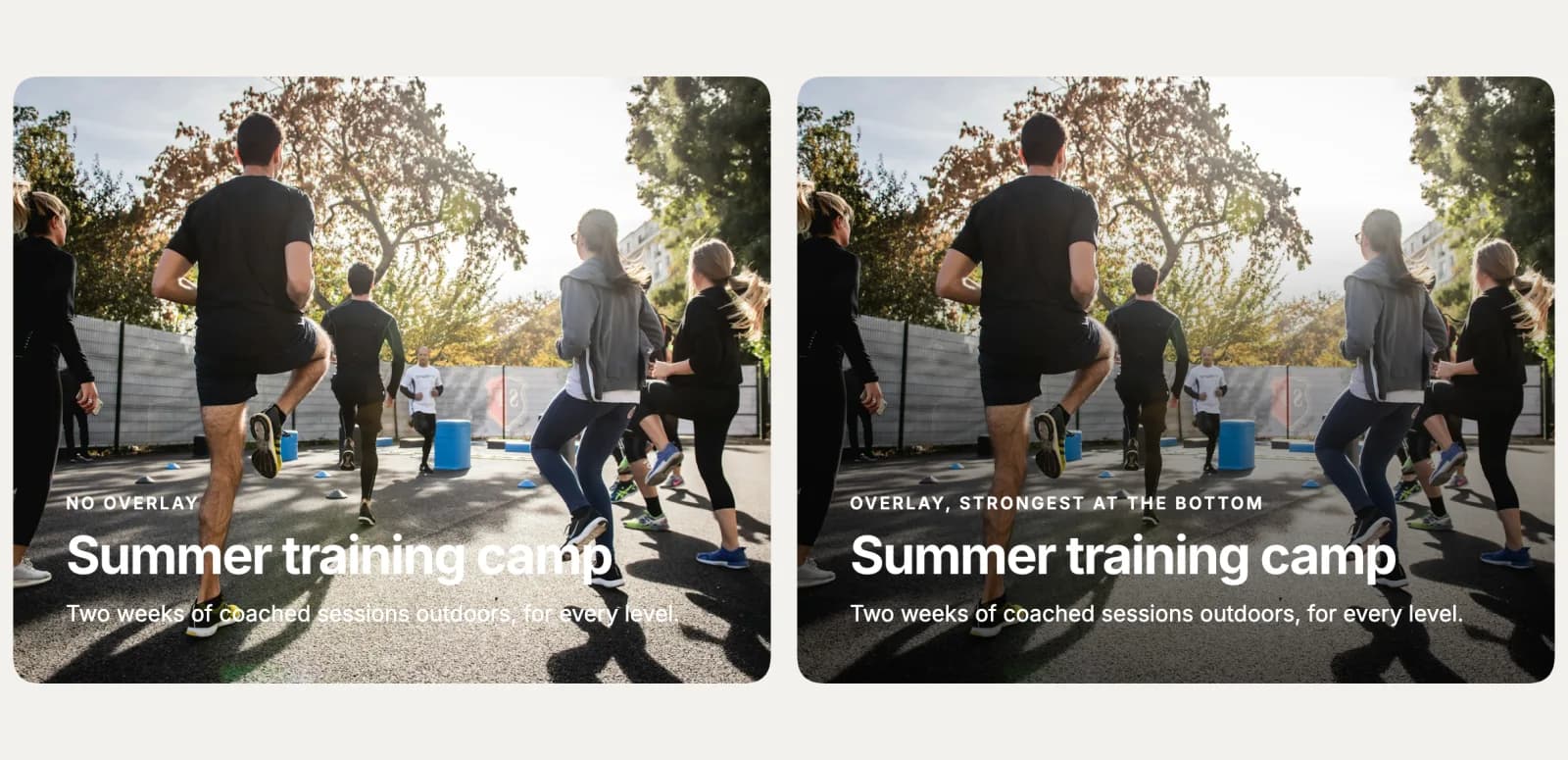 The same card without an overlay (left) and with black at 65%, strongest at the bottom (right).
hb_overlayA color over the background image or video. Pick a see-through color, for example black at 40%.
None, even colorhb_overlay_fadeStrongest at the bottom, top, left or right: the overlay fades out toward the other side, so the photo stays clear away from the text. Shown once an Overlay color is set.
Fullwidth Section tab
Switching Fullwidth Section to Enable turns a normal row into an edge-to-edge section with its own background, independent of WPBakery's own row-stretch option. See Full-width and edge-to-edge sections for how this compares to WPBakery's native stretch setting.
DisablefullwidthMakes the row stretch edge-to-edge in the browser. Enabling it reveals every option below.
Solid Colorbg_typeSolid Color, Gradient, Image/Parallax, or Hosted Video.
background_colorBackground color for the section. Leave empty for the default color.
Offfw_columnsStretches the row's columns edge-to-edge too, with no side padding, instead of just the background.
Offfw_same_heightForces every column in the row to match the height of the tallest one.
OffborderAdds a border line around the section.
Offwaved_border_topAdds a decorative wave shape along the top edge of the section.
Offwaved_border_bottomAdds a decorative wave shape along the bottom edge of the section.
Gradient, image, and video backgrounds
The exact fields shown depend on Background type:
Verticalgr_orientationVertical, Horizontal, Diagonal (two directions), or Radial. Shown when Background type is Gradient.
first_gr_color / second_gr_colorThe start and end colors of the gradient fill.
image_urlShown when Background type is Image/Parallax.
Offhb_parallaxMoves the background image at a different speed than the page as you scroll. Image backgrounds only.
No repeatbg_repeatUse Repeat for small textures, No repeat for full photos.
video_mp4Shown when Background type is Hosted Video. Upload the video to the Media Library first and paste its URL here.
video_webmA fallback for browsers that don't play MP4 (Firefox, Opera). Optional.
video_posterShown while the video loads, or if it fails to load.
Offvideo_textureAdds a subtle texture overlay on top of the video.
One Page Section tab
section_idA unique, space-free ID for this row, used as the scroll target for one-page navigation, for example about-us, linked to with #about-us.
section_titleThe row's label in the automatic dot navigation on one-page sites.
Setting either field marks the row as a one-page section. See Build a one-page site for the full setup.
Positioning tab
top_marginTop position offset in pixels, from -1000 to 1000. Negative values pull the row upward.
bottom_marginBottom position offset in pixels, from -1000 to 1000.
Layout tab
With WPBakery 9.0 or newer, rows, columns, and inner rows and columns get a Layout tab: flexbox content direction, alignment, gaps, minimum height, sticky columns, and corner shapes, all without writing custom CSS. See The Layout tab for every setting and which element types get which.
Stacked Cards tab
Also on WPBakery 9.0 or newer, a row's Stacked Cards tab turns its inner rows into cards that stick near the top of the screen and animate as the page scrolls past them. See Stacked Cards for the settings and how it behaves in older browsers.
Floating Images tab
A row's Floating Images tab scatters small images around its content that drift away from the mouse and float gently as the page scrolls. See Floating Images for every setting and how it behaves.
Background Video tab
On columns and inner columns, the Background Video tab plays a muted, looping video behind the column's content, clipped to the column's shape and corners.
hb_video_mp4URL of an MP4 video, for example from the Media Library. It plays muted and on a loop behind the column content. Keep it short and small: around 10 to 20 seconds and a few MB.
hb_video_webmOptional. The same video in WebM format, usually smaller. Browsers pick the format they support. Shown once a Video (MP4) URL is set.
hb_video_posterShown while the video loads and when it does not play. Leave empty to show the background from Design Options. Shown once a Video (MP4) URL is set.
Offhb_video_phoneSkips loading the video on phones and shows only the poster image there, to save mobile data. Shown once a Video (MP4) URL is set.
The video starts loading only once the column comes near the screen, pauses while it's off screen, and is replaced by the poster image (or the column's Design Options background) for visitors who prefer reduced motion.
Also extended
A few other elements pick up small Highend additions worth knowing about:
- Custom Heading gets a whole Typewriter tab: animate the heading text into place, letter by letter, with an optional highlight color, speed, and loop count. It also gets Letter Spacing (in em, for example -0.03 to tighten a large heading), Balance Lines, Font Size on Phones and Animation Delay.
- Custom Heading and Text Block get Scroll Reveal: the text starts faint and fills in, by word or by letter, as it scrolls up the screen.
- Google fonts in WPBakery's font setting include every font in Highend's Google Fonts list, so newer fonts such as Inter and Archivo can be picked in any element.
- Accordion, Tab, and Toggle items each get an Icon field for a leading icon next to their title.
Related
Layout tab
Every Layout tab setting, and which row, column, or inner element types get it.
Stacked Cards
Turn a row's inner rows into cards that stick and animate as the page scrolls.
Floating Images
Scatter small images around a row's content that drift away from the mouse.
Scroll Reveal
Text that fills in word by word as it scrolls up the screen.
Full-width and edge-to-edge sections
Compare Highend's Fullwidth Section against WPBakery's own row-stretch option.
Build a one-page site
Use Section ID and Section Title to build a scrolling one-page layout.
Elements
Every element Highend adds to WPBakery.