Colors
Pick a preset accent color or set your own, and see how the Color Manager tab relates to the WordPress Customizer.
Highend uses a single accent color throughout the site: link hovers, buttons, the active state of tabs and filters, and dozens of other small details. You set it from the Color Manager tab in Highend Options; everything else on the Customizer's Colors panel is configured separately, straight from the Customizer.
Where to find it: Go to HighendHighend OptionsColor Manager.
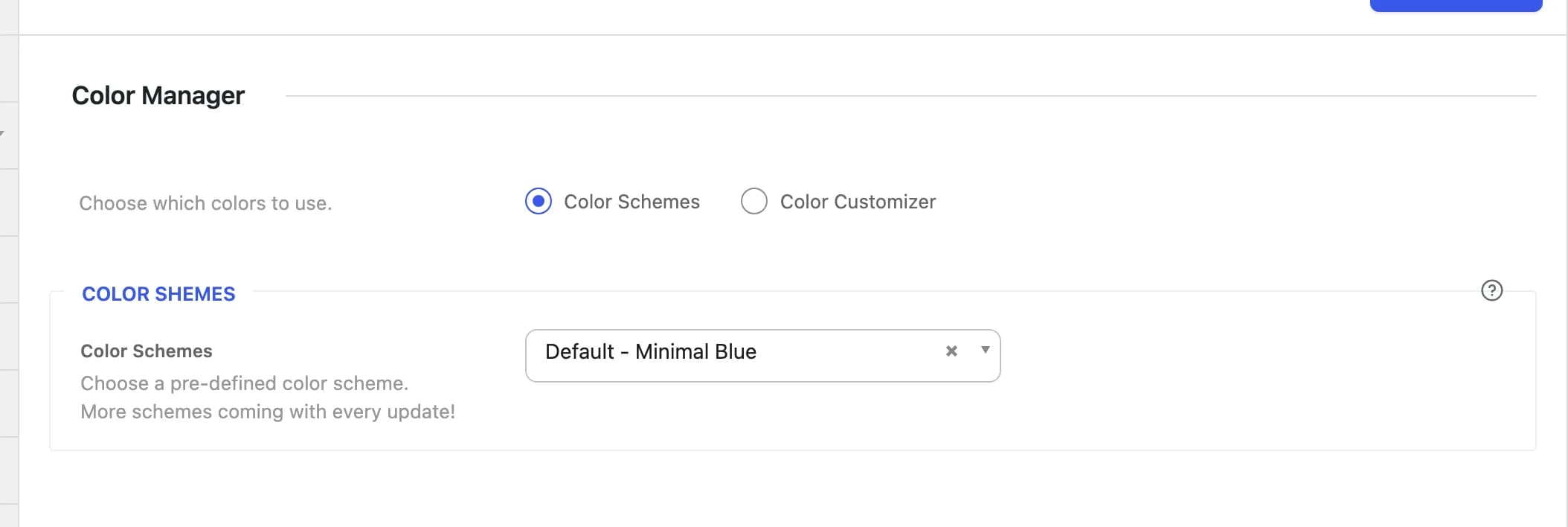
Choose a color source
Color Schemeshb_color_manager_typeSwitches the accent color between a built-in preset (Color Schemes) and a color you pick yourself in the Customizer (Color Customizer).
Color Schemes
Default - Minimal Bluehb_scheme_chooserPicks the accent color from one of 13 built-in presets.
| Scheme | Accent color |
|---|---|
| Default - Minimal Blue | #00aeef |
| Minimal Red | #c0392b |
| Minimal Green | #27ae60 |
| Minimal Green Alternative | #a0ce4e |
| Minimal Blue Alternative | #2980b9 |
| Minimal Pink | #f07fb2 |
| Minimal Yellow | #f1c40f |
| Minimal Orange | #e67e22 |
| Minimal Purple | #8e44ad |
| Minimal Grey | #7f8c8d |
| Business Blue | #2980b9 |
| Dark Elegance | #1bcbd1 |
| Orchyd | #e8bf56 |
A scheme only changes the accent color; it isn't a full site skin. Layout, typography, and every other color (header, footer, content backgrounds, and so on) come from their own settings regardless of which scheme is selected.
Color Customizer
Switches the accent color to whatever is set in the Customizer's Accent Color field, described below, instead of a preset.
The Run Live Color Customizer button opens the Customizer. From there, go to ColorsAccent and change Accent Color. See Customizer for the rest of what that panel controls.
How this relates to the Customizer
The Accent Color field in AppearanceCustomizeColorsAccent always exists and always holds a color (#1dc6df until you change it). The Color Manager toggle only decides whether the site uses that value. Set Choose which colors to use to Color Customizer and the site takes its accent color from that field, live, with the Customizer's usual instant preview. Set it to Color Schemes and the Customizer's Accent Color field is ignored in favor of your selected preset.
Everything else in the Customizer's Colors panel (the top bar, navigation, footer, and content colors) applies independently of this choice; see Customizer for the full list.