General settings
Site-wide behavior, from responsive design, smooth scrolling and page transitions to breadcrumbs, pagination style, and custom tracking code.
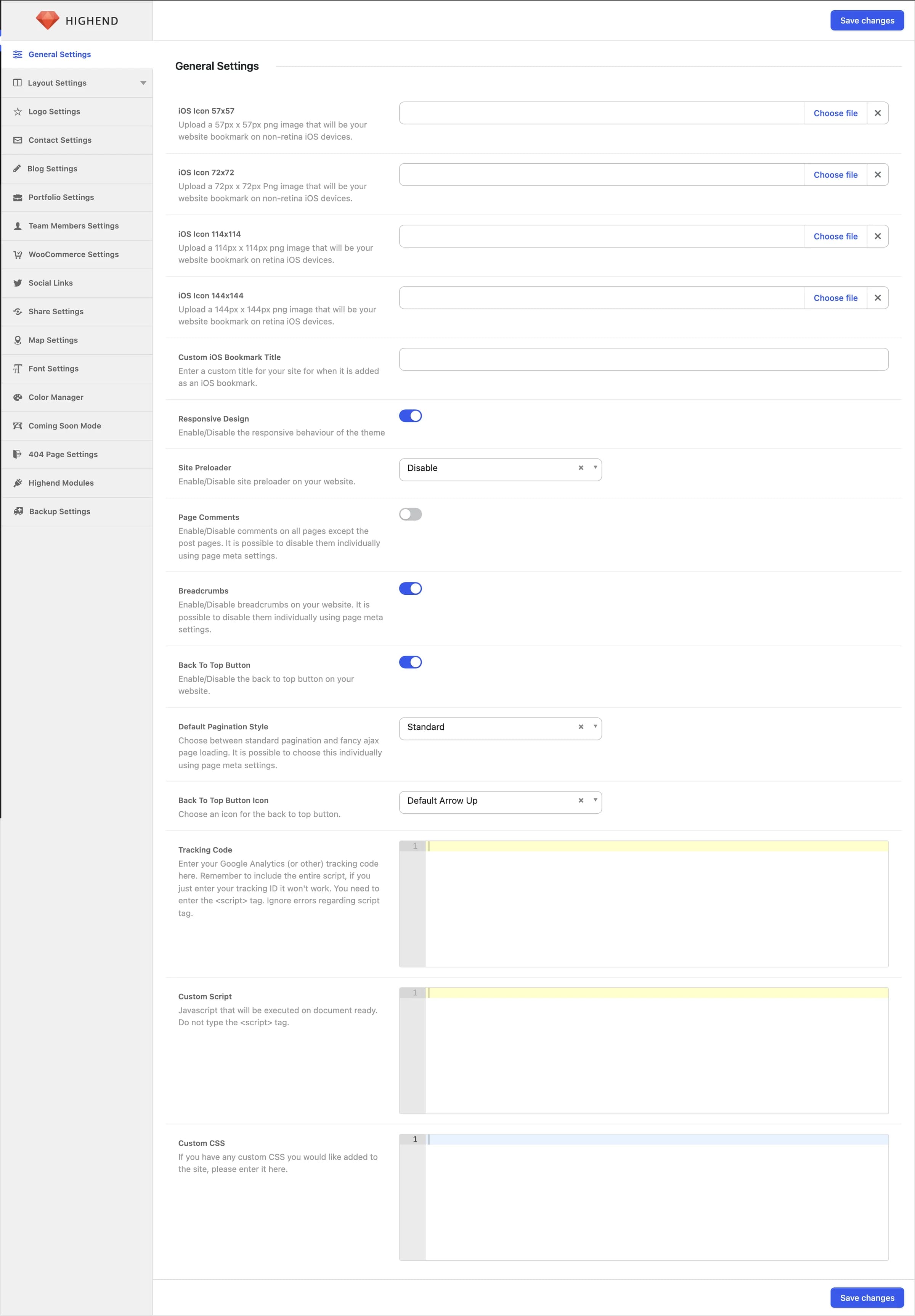
General Settings is the first tab in Highend Options. It covers site-wide behavior that doesn't belong to layout, header, or footer, plus a few fields for iOS home-screen bookmarks.
Where to find it: Go to HighendHighend OptionsGeneral Settings.
iOS bookmark icons
These four uploads set the icon shown when someone adds your site to their iOS home screen, plus a custom title for that bookmark. All are optional. Leave them empty and iOS falls back to a screenshot of the page.
hb_apple_icon57×57px PNG for non-retina iOS devices.
hb_apple_icon_7272×72px PNG for non-retina iOS devices.
hb_apple_icon_114114×114px PNG for retina iOS devices.
hb_apple_icon_144144×144px PNG for retina iOS devices.
hb_ios_bookmark_titleA custom title for the bookmark, shown instead of your site name.
Site behavior
Onhb_responsiveTurns on the theme's responsive breakpoints, the mobile hamburger menu, and the mobile-friendly viewport meta tag. Turning this off removes the mobile navigation entirely. Only turn it off if you're building a fixed-width, desktop-only site.
Disablehb_queryloaderShows a loading animation while the page's assets finish loading. Youtube like adds a thin loading bar; Circle Spinner shows a centered spinner that covers the page until it's ready.
Offhb_disable_page_commentsEnables comments on pages (comments on blog posts aren't affected). A page also needs comments allowed in its own Discussion settings.
Onhb_enable_breadcrumbsShows the breadcrumb trail near the page title. Can be overridden for an individual page in the Title tab of its Highend Settings box.
Onhb_to_top_buttonShows a button that scrolls back to the top of the page once the visitor scrolls down.
Default Arrow Uphb_back_to_top_iconIcon shown inside the back-to-top button. Appears only when that button is enabled.
Standardhb_pagination_styleStandard shows numbered page links; Load More replaces them with a button that loads the next set of posts via AJAX. Can be overridden per blog page in its template's tab of the Highend Settings box.
Scrolling and page transitions
Offhb_smooth_scrollEased scrolling with a mouse wheel or trackpad. Touch screens and visitors who prefer reduced motion keep normal scrolling. Can be turned on or off for an individual page in the Advanced tab of its Highend Settings box.
Mediumhb_smooth_scroll_intensityHow much the scrolling eases out: Subtle, Medium, or Strong. Shown when Smooth Scroll is on.
Offhb_page_transitionsAnimates from page to page when visitors follow links within your site.
Fadehb_page_transitions_styleFade, Fade up, Blur, Zoom, Parallax, or Cube. Parallax and Cube play in reverse on the back button. Shown when Page Transitions is on.
Normalhb_page_transitions_speedSlow, Normal, or Fast. Shown when Page Transitions is on.
Offhb_page_transitions_headerThe header stays in place above the changing page. When off, the whole page moves, header included. The WordPress toolbar always stays in place for logged-in users. Shown when Page Transitions is on.
Offhb_page_transitions_phonesShown when Page Transitions is on.
Page Transitions use the browser's View Transitions API; browsers without support just load pages as usual, no animation. Both Smooth Scroll and Page Transitions turn themselves off for visitors who prefer reduced motion, and Smooth Scroll also stays off on touch screens.
Custom code
hb_analytics_codeGoogle Analytics (or any other) tracking snippet, printed in the site footer. Paste the entire snippet including its own <script> tag. A bare tracking ID won't work.
hb_custom_scriptJavaScript that runs on document ready, printed in the site footer. Don't wrap it in a <script> tag. Highend adds one for you automatically.
hb_custom_cssCSS appended to the end of the theme's generated stylesheet, so it always wins over Highend's own styles without needing !important.