Menu Pricing Item
A single title-and-price row, for restaurant menus or simple price lists.
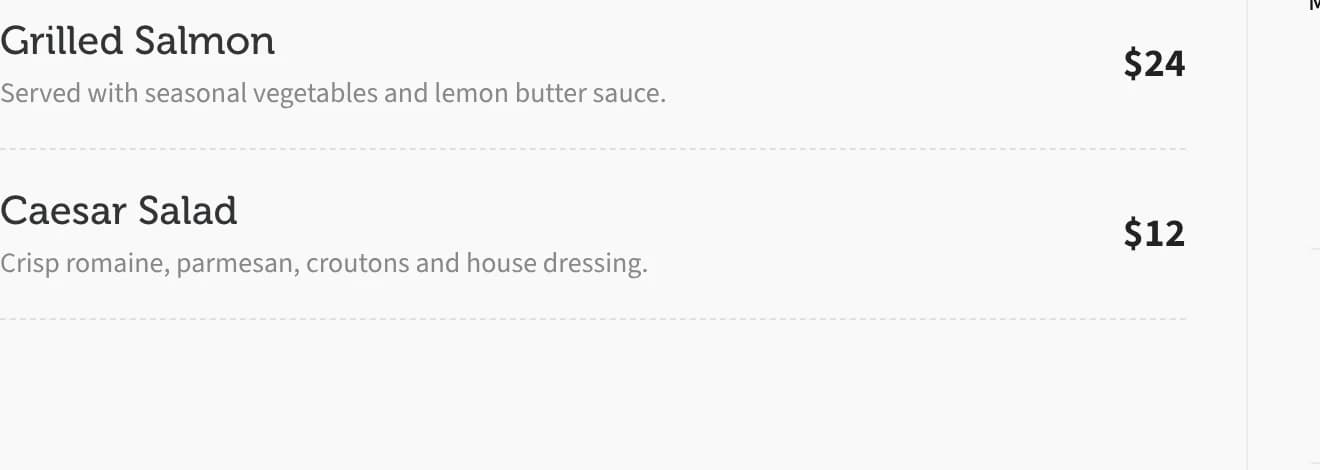
Menu Pricing Item is a single row with a title, an optional description, and a price aligned to the right. Repeat it for a restaurant menu or any simple list of items and prices.
Add it
In WPBakery, click Add Element and pick Menu Pricing Item from the Highend Shortcodes category. Or use the shortcode. See Shortcode.
Menu Pricing Item needs the Custom Post Type: Pricing Tables module. It's on by default; check under HighendHighend OptionsHighend Modules. With it off, the element and its shortcode are removed entirely, even though it doesn't use the Pricing Tables post type itself.
Settings
Enter your title heretitleThe item's name.
textOptional description shown below the title.
$2.99priceThe price, with whatever currency symbol or format you want; it's printed as-is.
Common settings
Menu Pricing Item also has Entrance Animation, Entrance Delay, and Extra class name fields. See the Elements overview.
Shortcode
[menu_pricing_item title="Grilled Salmon" text="Served with seasonal vegetables and lemon butter sauce." price="$24"]If you omit title, the shortcode itself defaults to "My Menu item" rather than the "Enter your title here" placeholder WPBakery pre-fills.
Tips
Stack several [menu_pricing_item] elements inside one column to build a full menu section; each one renders as its own row with a dashed divider below it.