Fullwidth Section
A deprecated full-width background section with color, image, texture, or video backgrounds, superseded by WPBakery's Row.
Fullwidth Section wraps its content in a full-browser-width band with a color, image, texture, or video background. It predates WPBakery's own row-stretching options and is now deprecated. New pages should use a Row instead.

WPBakery hides Fullwidth Section from the main Add Element list; it only appears under the Deprecated tab, for editing pages that already use it. For new content, add a Row, enable its own Fullwidth Section option, and set its background there. See Fullwidth sections. The two work differently under the hood (this element wraps [fullwidth_section]…[/fullwidth_section] around fixed content; a Row's fullwidth option changes the row itself), but produce a similar full-width band.
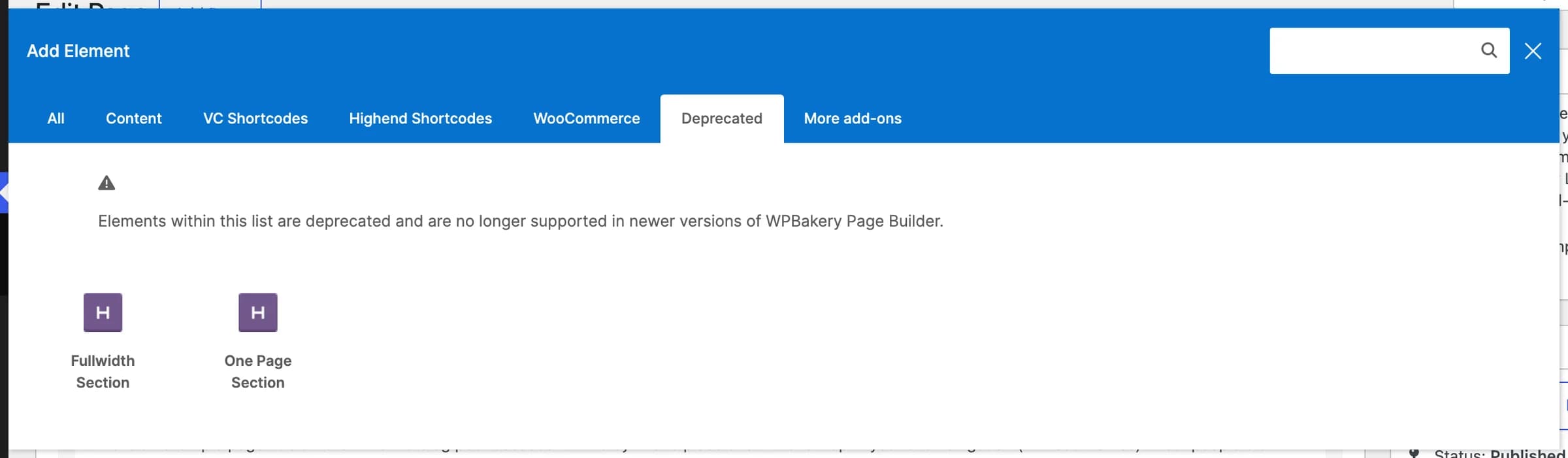
Add it
To edit an existing Fullwidth Section, open the page in WPBakery and double-click the element. To add a new one, open Add Element, switch to the Deprecated tab, and pick Fullwidth Section, or use the shortcode directly; see Shortcode.
Settings
contentThe section's body content, entered between the shortcode tags.
Background Colorbackground_typeOptions: Background Color, Background Image, Background Texture, Background Video. Controls which of the fields below apply.
OffborderAdds a border around the section.
Darktext_colorOptions: Dark, Light. Use Light when the background is dark, and vice versa.
bg_colorUsed when Background Type is Background Color (or as a fallback color behind an image/video).
imageUsed when Background Type is Background Image or Background Texture.
OffparallaxAdds a parallax scroll effect. Only applies to Background Image.
Offwaved_border_topAdds a decorative wave shape along the top edge, colored from Background Color.
Offwaved_border_bottomAdds a decorative wave shape along the bottom edge.
Offscissors_iconAdds a small scissors icon, for a "cut along the line" effect.
bg_video_mp4Used when Background Type is Background Video. Upload the video to the Media Library first and paste its URL (or attachment ID) here.
bg_video_ogvAn OGG-format fallback for the MP4 video.
bg_video_posterShown while the video loads, or if it can't play.
OffoverlayAdds a texture overlay on top of the video.
margin_topTop margin. Enter a number for pixels, or a value with a unit (em, %, etc). Under a Position tab.
margin_bottomBottom margin, same format as Margin Top. Under a Position tab.
30padding_topTop padding. Enter a plain number for pixels, or a value with a unit (em, %, etc).
30padding_bottomBottom padding, same format as Inside Padding Top.
idAn optional HTML id for linking to this section, for example about-us; link to it with #about-us.
Common settings
Fullwidth Section also has an Extra class name field (see the Elements overview). It does not have the Entrance Animation/Delay fields most other elements have.
Shortcode
[fullwidth_section background_type="color" bg_color="#2c3e50" text_color="light" padding_top="70" padding_bottom="70"]
[title type="h2" color="#ffffff" align="center"]Fullwidth Section[/title]
[/fullwidth_section]
Everything between [fullwidth_section] and [/fullwidth_section] renders inside the band, typically a row/column layout or other elements, not raw text.