Content Box
Wrap any content in a bordered box, with an optional header and icon, or a custom background color.
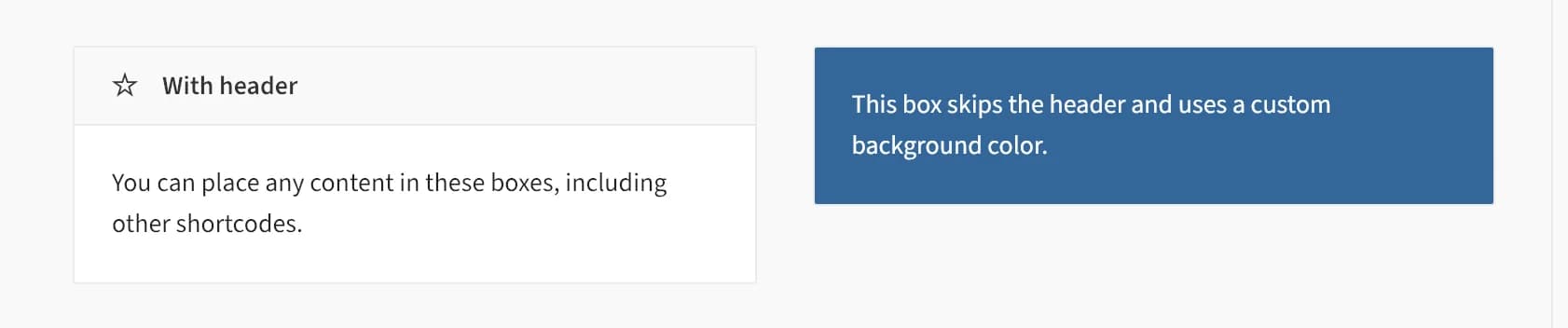
Content Box wraps other elements or text in a simple bordered container, with an optional header bar (title plus icon) or a plain background color. Use it to visually group related content or call out a section of the page.
Add it
In WPBakery, click Add Element and pick Content Box from the Highend Shortcodes category. Or use the shortcode (see Shortcode).
Settings
With HeadertypeWhether to show the header bar. Options: With Header, Without Header.
titleThe header text. Only shown when Box Style is With Header.
contentThe box's body content, entered between the shortcode tags rather than in a field.
iconAn icon shown before the header title. See the icon list. Only shown when Box Style is With Header.
NonecolorCustom background color for the box. Leave empty for the theme's default white/light background.
Darktext_colorText color style to pair with a dark Background Color. Options: Dark, Light.
Common settings
Content Box also has Entrance Animation, Entrance Delay, and Extra class name fields (see the Elements overview).
Shortcode
[content_box type="with-header" title="With header" icon="hb-moon-star" text_color="dark"]You can place any content in these boxes, including other shortcodes.[/content_box]The body content is between [content_box] and [/content_box]: it maps to the Text field, not an attribute.
Enter a hex color with the leading # (for example #336699) in Background Color. Without it, Highend treats the value as a CSS class name instead of a color, so the background stays unstyled. Entering the word default is treated the same as leaving the field empty.